DeviceCloud MCP
Triage failing DeviceCloud runs from your editor
Get a DeviceCloud API key ↗DeviceCloud runs your Maestro UI flows on real devices; your CI triggers the runs. When one goes red, the evidence lives in the web dashboard: the fail reason, the failure screenshot, the logs. This MCP server pulls it straight into the conversation so your assistant can read it, find the root cause, and fix the flow or the app code.
Setup is a single config block:
{
  "mcpServers": {
    "devicecloud": {
      "command": "npx",
      "args": ["-y", "devicecloud-mcp"],
      "env": {
        "DEVICE_CLOUD_API_KEY": "your-api-key"
      }
    }
  }
}
The two tools to start with are diagnose_run and suite_health. diagnose_run folds retries per flow, so a flow that failed and then passed is reported as flaky-recovered instead of broken, and it auto-downloads the failure screenshots. suite_health surfaces regressions first, flows that were passing and recently started failing, so you know what’s worth fixing before diving in.
Everything is read-only against the DeviceCloud REST API. Nothing an agent does can trigger a billable run; starting and re-running tests stay with your CI, and cancelling a run stays in the dashboard.
Add the config
Drop one JSON block into your MCP client config. The same shape works in Claude Code, Claude Desktop, Cursor, Windsurf, and any client that speaks stdio MCP.
Set your API key
Grab a key from the DeviceCloud settings page and pass it as DEVICE_CLOUD_API_KEY. That's the only configuration the server takes.
Ask about a failing run
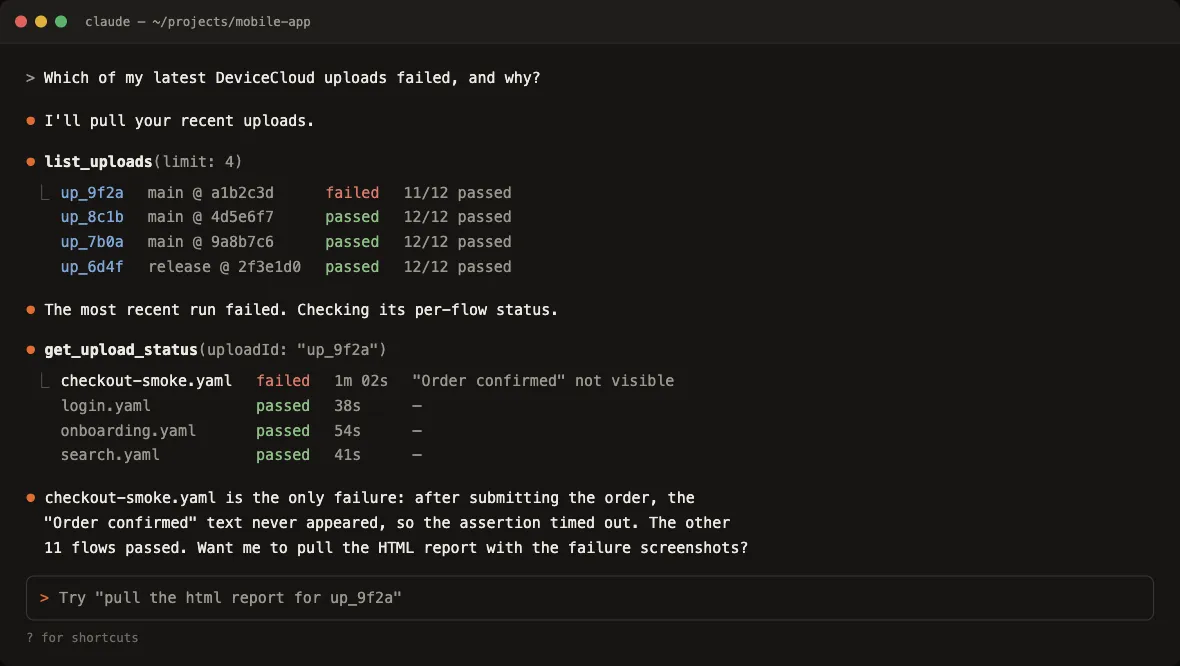
Say "why did the release flow fail?" and the assistant checks for real; fail reasons, screenshots, and pass rates land in the conversation.
Exposed tools
| Tool | What it does |
|---|---|
| diagnose_run | One-call triage of a run: failed flows, fail reasons, failure-screenshot paths, and a passed/failed/flaky summary |
| suite_health | Classifies every flow over a lookback window as healthy, flaky, broken, or regression, ranked worst-first |
| list_uploads | Recent uploads; filter by name, date, limit, offset |
| get_upload_status | Overall status plus per-flow status and fail reason |
| get_results | Per-flow rows with status, fail reason, and duration |
| get_junit_report | Raw JUnit XML for an upload |
| get_html_report | Downloads and auto-unzips the HTML report with failure screenshots highlighted |
| download_artifacts | Zip of raw artifacts: logs, screenshots, video |
| list_flow_analytics | Per-flow pass rate and run counts over a lookback window |
| get_flow_runs | Run history for a specific flow file |